useState vs useReducer
언제 useState와 useReducer를 사용해야 할까?
useState 사용 시
첫 번째 예제 : 하나의 함수에서 여러개의 state들을 업데이트 하는 상황이 있다고 가정해보자.
loading, post, error 3가지 state를 통해 포스트를 불러와야 한다.
다음과 같이 버튼을 누르면 데이터를 받아오는 코드를 작성해보자.

BEFORE
import { useState } from 'react'

const Test = () => {
    const [loading, setLoading] = useState(false)
    const [post, setPost] = useState({})
    const [error, setError] = useState(false)

    const handleFetch = () => {
        fetch('https://jsonplaceholder.typicode.com/posts/1')
            .then(res => {
                return res.json()
            })
            .then(data => {})
            .catch(err => {})
    }
    return (
        <div>
            <button onClick={handleFetch}>
                {loading ? '로딩중입니다..' : '포스트 불러오기'}
            </button>
            <p>{post?.title}</p>
            <span>{error && '무언가 오류가 발생..!'}</span>
        </div>
    )
}

export default Test
AFTER
import { useState } from 'react'

const Test = () => {
    const [loading, setLoading] = useState(false)
    const [post, setPost] = useState({})
    const [error, setError] = useState(false)

    // 변경사항
    const handleFetch = () => {
        setLoading(true);
        setError(false);
        fetch('https://jsonplaceholder.typicode.com/posts/1')
            .then(res => {
                return res.json()
            })
            .then(data => {
                setPost(data);
                setLoading(false);
            })
            .catch(err => {
                setError(true);
                setLoading(false);
            })
    }
    return (
        <div>
            <button onClick={handleFetch}>
                {loading ? '로딩중입니다..' : '포스트 불러오기'}
            </button>
            <p>{post?.title}</p>
            <span>{error && '무언가 오류가 발생..!'}</span>
        </div>
    )
}

export default Test
useState를 사용해서 완벽하게 작동시킬 수 있다. 그러나 하나의 함수에 6개의 setState 함수를 사용해야 한다는 문제점이 존재한다.
만약 useState를 더 많이 사용하면 그만큼 코드가 길어질 것이다.
두 번째 예제 : 이번엔 하나의 state를 사용하는데, 복잡한 state 하나가 존재하며 아래와 같은 내용을 전부 컨트롤해야 한다고 가정해보자.

- 제목, 내용, 가격을 설정할 수 있고
- 카테고리를 선택하고
- 태그를 추가하며 태그를 클릭 시 삭제할 수 있고
- 개수 설정을 할 수 있다.
import React, { useRef, useState } from 'react'

const Form = () => {
    const [product, setProduct] = useState({
        title: '',
        desc: '',
        price: 0,
        category: '',
        tags: [],
        images: {
            sm: '',
            md: '',
            lg: '',
        },
        quantity: 0,
    })

    const handleChange = e => {
        setProduct(prev => ({ ...prev, [e.target.name]: e.target.value }))
    }

    const tagRef = useRef()

    const handleTags = () => {
        const tags = tagRef.current.value.split(',')
        tags.forEach(tag => {
            setProduct(prev => ({ ...prev, tags: [...prev.tags, tag] }))
        })
    }

    const handleRemoveTag = tag => {
        setProduct(prev => ({
            ...prev,
            tags: prev.tags.filter(t => t !== tag),
        }))
    }

    const handleIncrease = () => {
        setProduct(prev => ({ ...prev, quantity: prev.quantity + 1 }))
    }

    const handleDecrease = () => {
        setProduct(prev => ({
            ...prev,
            quantity: prev.quantity - 1,
        }))
    }

    return (
        <div>
            <form className='flex flex-col items-center justify-center h-[500px] gap-5'>
                <input
                    type="text"
                    name="title"
                    onChange={handleChange}
                    placeholder="제목"
                />
                <input
                    type="text"
                    name="desc"
                    onChange={handleChange}
                    placeholder="내용"
                />
                <input
                    type="number"
                    name="price"
                    onChange={handleChange}
                    placeholder="가격"
                />
                <p>카테고리:</p>
                <select name="category" id="category" onChange={handleChange}>
                    <option value="sneakers">신발</option>
                    <option value="tshirts">티셔츠</option>
                    <option value="jeans">바지</option>
                </select>
                <p>Tags:</p>
                <textarea
                    ref={tagRef}
                    placeholder="태그를 콤마(,)로 구분해주세요"
                ></textarea>
                <button type="button" onClick={handleTags}>
                    태그 추가
                </button>
                <div className="tags">
                    {product.tags.map(tag => (
                        <small key={tag} onClick={() => handleRemoveTag(tag)}>
                            {tag}
                        </small>
                    ))}
                </div>
                <div className="quantity">
                    <button type="button" onClick={handleDecrease}>
                        -
                    </button>
                    <span>개수 ({product.quantity})</span>
                    <button type="button" onClick={handleIncrease}>
                        +
                    </button>
                </div>
            </form>
        </div>
    )
}

export default Form
이 경우에는 useState를 사용하면 코드가 더욱 복잡해진다.
모든 값들에 대해 함수를 작성하기 때문에 코드를 알아보기 힘들 뿐만 아니라, 중첩된 배열 또는 오브젝트를 다루기 위해 빈번히 spread function(...)을 사용하기 때문에 실수할 가능성도 높아진다.
useState 코드를 useReducer로 대체하기
useReducer에는 state(상태)와 action(행동)이 존재한다.
action type 따라 state 값을 변경하여 반환해주게 되며, 값을 전달받아 업데이트 해 줄 수도 있다.(payload)
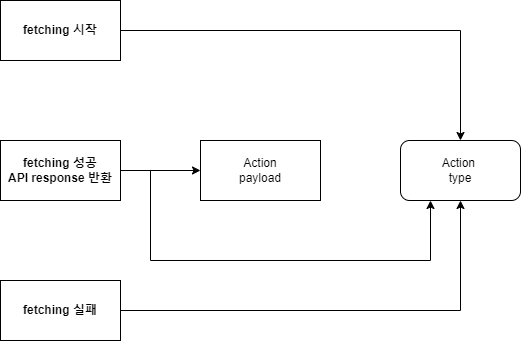
아래와 같이 postReducer.js 코드를 작성할 수 있다.
초기값으로 INITIAL_STATE를 세팅하고 action type에 따라 어떤 행동을 할 지 결정해주면 된다.
const INITIAL_STATE = {
    loading: false,
    post: {},
    error: false,
}

const postReducer = (state, action) => {
    switch (action.type) {
        case 'FETCH_START':
            return {
                loading: true,
                error: false,
                post: {},
            }
        case 'FETCH_SUCCESS':
            return {
                ...state,
                loading: false,
                post: action.payload,
            }
        case 'FETCH_ERROR':
            return {
                loading: false,
                error: true,
                post: {},
            }
        deafult:
            return state;
    }
}
이제 첫 번째 예제의 코드를 useReducer를 사용한 코드로 바꿔보자.
import { useReducer } from 'react'

const Test = () => {

    const [state,dispatch] =  useReducer(postReducer, INITIAL_STATE)

    const handleFetch = () => {
        // fetch 시작
        dispatch({type:"FETCH_START"});
        fetch('https://jsonplaceholder.typicode.com/posts/1')
            .then(res => {
                return res.json()
            })
            .then(data => {
                // fetch 성공
                dispatch({type:"FETCH_SUCCESS", payload: data});
            })
            .catch(err => {
                // fetch 에러
                dispatch({type:"FETCH_ERROR"});
            })
    }
    return (
        <div className='w-[100vw] h-[100vh] flex flex-col items-center justify-center'>
            <button onClick={handleFetch} className='p-10 m-10'>
                {state.loading ? '로딩중입니다..' : '포스트 불러오기'}
            </button>
            <p>{state.post?.title}</p>
            <span>{state.error && '무언가 오류가 발생..!'}</span>
        </div>
    )
}

export default Test
코드가 좀 더 직관적이고 불필요한 코드의 양이 조금 줄일 수 있었다.
관리하는 state가 많아질수록 더 많은 코드를 줄일 수 있을것이다.
TIP : dispatch 함수 안에서 지정할 type들을 바깥으로 빼놓는 것이 좋다.
실수가 줄어들고, 가끔씩 warning이 발생하기도 하는데 이를 방지해준다.
postActionTypes.js
export const ACTION_TYPES = {
    FETCH_START: 'FETCH_START',
    FETCH_SUCCESS: 'FETCH_SUCCESS',
    FETCH_ERROR: 'FETCH_ERROR',
}
reducer를 적용한 함수
    const handleFetch = () => {
        // fetch 시작
        dispatch({ type: ACTION_TYPES.FETCH_START })
        fetch('https://jsonplaceholder.typicode.com/posts/1')
            .then(res => {
                return res.json()
            })
            .then(data => {
                // fetch 성공

                dispatch({ type: ACTION_TYPES.FETCH_SUCCESS, payload: data })
            })
            .catch(err => {
                // fetch 에러
                dispatch({ type: ACTION_TYPES.FETCH_ERROR })
            })
    }
이번엔 두 번째 예제를 useReducer를 사용한 코드로 변경해보자.
formReducer.js
export const INITIAL_STATE = {
    title: '',
    desc: '',
    price: 0,
    category: '',
    tags: [],
    images: {
        sm: '',
        md: '',
        lg: '',
    },
    quantity: 0,
}

export const formReducer = (state, action) => {
    switch(action.type) {
        case "CHANGE_INPUT":
            return {
                ...state,
                [action.payload.name]: action.payload.value
            };
        case "ADD_TAG":
            return {
                ...state,
                tags: [...state.tags, action.payload]
            };
        case "REMOVE_TAG":
            return {
                ...state,
                tags: state.tags.filter(tag => tag !== action.payload)
            };
        case "INCREASE":
            return {
                ...state,
                quantity: state.quantity + 1,
            };
        case "DECREASE":
            return {
                ...state,
                quantity: state.quantity - 1,
            };
        default:
            return state;
    }
}
Form.jsx
import React, { useReducer, useRef } from 'react'
import {formReducer, INITIAL_STATE} from "./formReducer"

const Form = () => {
    const [state, dispatch] = useReducer(formReducer, INITIAL_STATE);
    const tagRef = useRef();

    const handleChange = e => {
        dispatch({type:"CHANGE_INPUT", payload: {
            name: e.target.name, value: e.target.value
        }})
    }

    const handleTags = () => {
        const tags = tagRef.current.value.split(",");
        tags.forEach(tag => {
            dispatch({type: "ADD_TAG", payload: tag});
        })
    }

    return (
        <div>
            <form>
                <input
                    type="text"
                    name="title"
                    onChange={handleChange}
                    placeholder="제목"
                />
                <input
                    type="text"
                    name="desc"
                    onChange={handleChange}
                    placeholder="내용"
                />
                <input
                    type="number"
                    name="price"
                    onChange={handleChange}
                    placeholder="가격"
                />
                <p>카테고리:</p>
                <select name="category" id="category" onChange={handleChange}>
                    <option value="sneakers">신발</option>
                    <option value="tshirts">티셔츠</option>
                    <option value="jeans">바지</option>
                </select>
                <p>Tags:</p>
                <textarea
                    ref={tagRef}
                    placeholder="태그를 콤마(,)로 구분해주세요"
                ></textarea>
                <button type="button" onClick={handleTags}>
                    태그 추가
                </button>
                <div className="tags">
                    {state?.tags.map(tag => (
                        <small key={tag} onClick={() => dispatch({type: "REMOVE_TAG", payload: tag})}>
                            {tag}
                        </small>
                    ))}
                </div>
                <div className="quantity">
                    <button type="button" onClick={() => dispatch({type: "DECREASE"})}>
                        -
                    </button>
                    <span>개수 ({state?.quantity})</span>
                    <button type="button" onClick={() => dispatch({type: "INCREASE"})}>
                        +
                    </button>
                </div>
            </form>
        </div>
    )
}

export default Form
코드가 더 깔끔하고 직관적으로 변한것을 볼 수 있다!
'React' 카테고리의 다른 글
| React - nextjs 사용 시 Parsing error : Cannot find module 'next/babel' 오류 해결방법 (0) | 2021.11.13 |
|---|---|
| React - react-router-dom의 Switch 사용 시 주의사항 (0) | 2021.09.16 |
| React - useEffect 사용 시 array를 dependency로 사용했을 시 나타나는 경고 (0) | 2021.09.16 |


